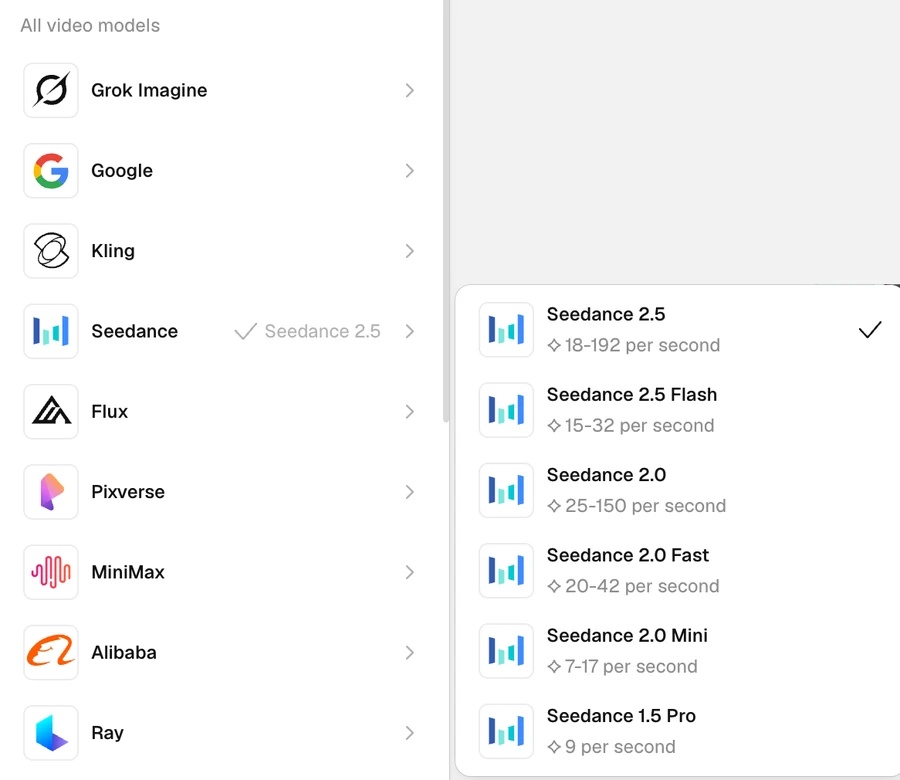
ByteDance's faster Seedance 2.5 tier is live in Recraft Studio. Here is how it compares with Seedance 2.5 on the same prompts.
Seedance 2.5 Flash is now in Recraft Studio. It is the faster, lighter tier of ByteDance's Seedance 2.5 video model, with the same prompt-to-video workflow, sound, and clips of up to 30 seconds, at 480p or 720p.
ByteDance says Flash generates about twice as fast as Seedance 2.5, and in Studio it starts at 15 credits per second of video. We ran the same four prompts through Seedance 2.5 Flash and Seedance 2.5, so you can judge the difference on real clips.
Seedance 2.5 Flash at a glance
Recraft Studio settings as of November 17, 2026. The model selector always shows the current credit cost.
Seedance 2.5 Flash
Seedance 2.5
Developer
ByteDance
ByteDance
Resolution
Auto, 480p, 720p
Auto, 480p, 720p, 1080p, 4K
Clip length
Auto or 4 to 30 seconds
Up to 30 seconds
Sound
Generated audio, on or off
Generated audio, on or off
Start from
Prompt, first frame, references
Prompt, first frame, references
Credits per second
15 to 32
18 to 192
Plans
Paid plans
Paid plans
What's new in Seedance 2.5 Flash
ByteDance released Flash in November 2026 as the second tier of the Seedance 2.5 family, next to the flagship model. The Seedance 2.5 documentation covers both. What Flash brings:
Speed. ByteDance says Flash generates about twice as fast as Seedance 2.5, so you get to the next iteration sooner.
Lower cost. In Recraft Studio, Flash costs 15 to 32 credits per second of video, against 18 to 192 for Seedance 2.5.
The same core features. Flash keeps generated sound, clips from 4 to 30 seconds, a first-frame option, and references for the subject or style.
A 720p ceiling. Flash renders at 480p or 720p. For 1080p or 4K, switch to Seedance 2.5.
Seedance 2.5 Flash vs Seedance 2.5: which one to use
The two models share a prompt style, so a prompt that works in one carries straight over to the other. The difference is the job:
Use Flash to explore. Storyboards, prompt tests, social clips at 720p, and a handful of directions before a review. When you need to see five versions of a shot, speed and cost matter most.
Use Seedance 2.5 for the final cut. Hero shots, client deliverables, and anything that needs 1080p or 4K.
A simple workflow: find the shot with Flash, then run the winning prompt through Seedance 2.5 for the final render. Both clips land on the same canvas, so the comparison is one glance away.
How we tested Seedance 2.5 Flash
Every clip is a single generation from the prompt shown under it, with no edits: 16:9, 720p, 5 seconds, sound off. Seedance 2.5 Flash and Seedance 2.5 ran on the same prompts. Press play on either clip in a pair and both start together.
Seedance 2.5 Flash and Seedance 2.5, side by side
Product commercial: liquid-metal flowers
Seedance 2.5 Flash
Seedance 2.5
PromptOversized liquid-metal flowers slowly bloom and melt around a blank silver coffee pouch on a reflective surface. Chrome drops fall and splash in slow motion. Slow orbiting camera, soft studio light, luxury product commercial.
Both models follow the brief: chrome flowers open around a blank silver pouch and drip liquid metal onto a reflective surface. Flash sets the scene in a bright white studio and grows a full crown of chrome petals, with beads of metal hanging in the air. Seedance 2.5 chooses warm, low-key light and two large blooms that melt into puddles, closer to the mood of a luxury spot.
Koi under fractured ice
Seedance 2.5 Flash
Seedance 2.5
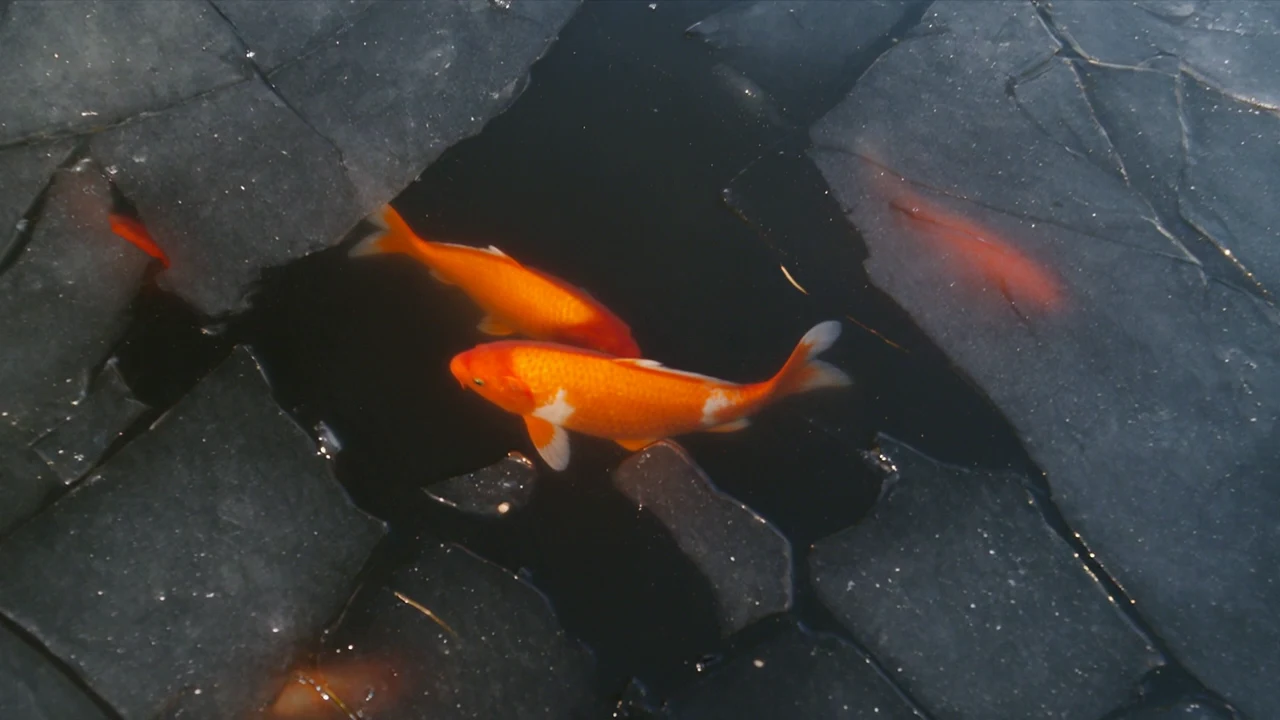
PromptBright orange koi swim slowly beneath floating sheets of fractured translucent ice. Sunlight ripples across the water and the ice plates drift and touch. Slow overhead camera drift, natural light, photorealistic.
Flash renders the ice as dark, matte plates and follows a few koi through the open water between them as the camera drifts closer. Seedance 2.5 makes the ice glassy and see-through, so a whole school of koi glows orange under the plates.
Cowboy at a gas station
Seedance 2.5 Flash
Seedance 2.5
PromptA rugged young cowboy in an oversized turquoise fur coat and a cream cowboy hat leans against a vintage yellow convertible at a deserted gas station under a deep crimson sky. Wind moves the fur, a station sign flickers, dust drifts across the asphalt. Slow push-in, harsh flash look, cinematic.
Both clips push in on the cowboy against a red sky. Flash keeps the camera low and frontal, with the station sign glowing over his shoulder. Seedance 2.5 starts high in a haze of red dust and travels all the way to a tight close-up of his face, a bigger camera move in the same five seconds.
Conductor in a desert storm
Seedance 2.5 Flash
Seedance 2.5
PromptA conductor in an oversized white ceremonial uniform with gold epaulettes sweeps his arms in the middle of an empty desert highway. Rows of red velvet chairs stand behind him. A storm rolls in and lightning flashes across the sky. Low-angle tracking shot, cinematic fashion film.
Both clips keep the conductor centered on the road with the red chairs behind him. Flash holds a steady wide shot while the storm clouds roll in. Seedance 2.5 tracks in from far away to a low-angle close-up, and a flash of lightning lights him up at the end.
How to use Seedance 2.5 Flash in Recraft Studio
Open a project, switch the Create panel to Video, and choose Seedance 2.5 Flash under Seedance in the model selector.
Set the aspect ratio, resolution, clip length, and sound.
Write a prompt. To control the opening shot, add a first frame, or add references for the subject or style.
Generate, then run the same prompt through Seedance 2.5 when you need a higher-resolution final.
The Seedance family in Studio also includes Seedance 2.0, 2.0 Fast, 2.0 Mini, and 1.5 Pro, each with its own price per second in the model selector. For the launch of the flagship model, see Seedance 2.5 lands in Recraft Studio.
Seedance 2.5 Flash is the faster, lower-cost tier of ByteDance's Seedance 2.5 video model, released in November 2026. It generates clips of 4 to 30 seconds with sound at 480p or 720p, from a prompt, a first frame, or references. In Recraft Studio, it is available on paid plans.
Is Seedance 2.5 free in Recraft?
Seedance 2.5 and Seedance 2.5 Flash are available on Recraft's paid plans. Flash costs 15 to 32 credits per second of video, and Seedance 2.5 costs 18 to 192 credits per second, depending on resolution and other settings. The model selector always shows the current cost.
What is the difference between Seedance 2.5 Flash and Seedance 2.5?
Flash is built for speed and cost: ByteDance says it generates about twice as fast, and in Recraft Studio it costs 15 to 32 credits per second against 18 to 192 for Seedance 2.5. Flash renders at up to 720p, while Seedance 2.5 also offers 1080p and 4K. Use Flash to explore and Seedance 2.5 for the final render.
How long can Seedance 2.5 Flash videos be?
In Recraft Studio, a Seedance 2.5 Flash clip can run from 4 to 30 seconds. You can also leave the length on Auto and let the model choose. The credit cost is per second, so longer clips cost more.
How do I use Seedance 2.5 Flash in Recraft?
Open a project in Recraft Studio, switch the Create panel to Video, and choose Seedance 2.5 Flash in the model selector. Set the aspect ratio, resolution, clip length, and sound, write a prompt, and generate. You can add a first frame or references to guide the shot.